n8n Queue Mode Explained: What It Is and When You Need It
Key Takeaways (30‑Second Summary)
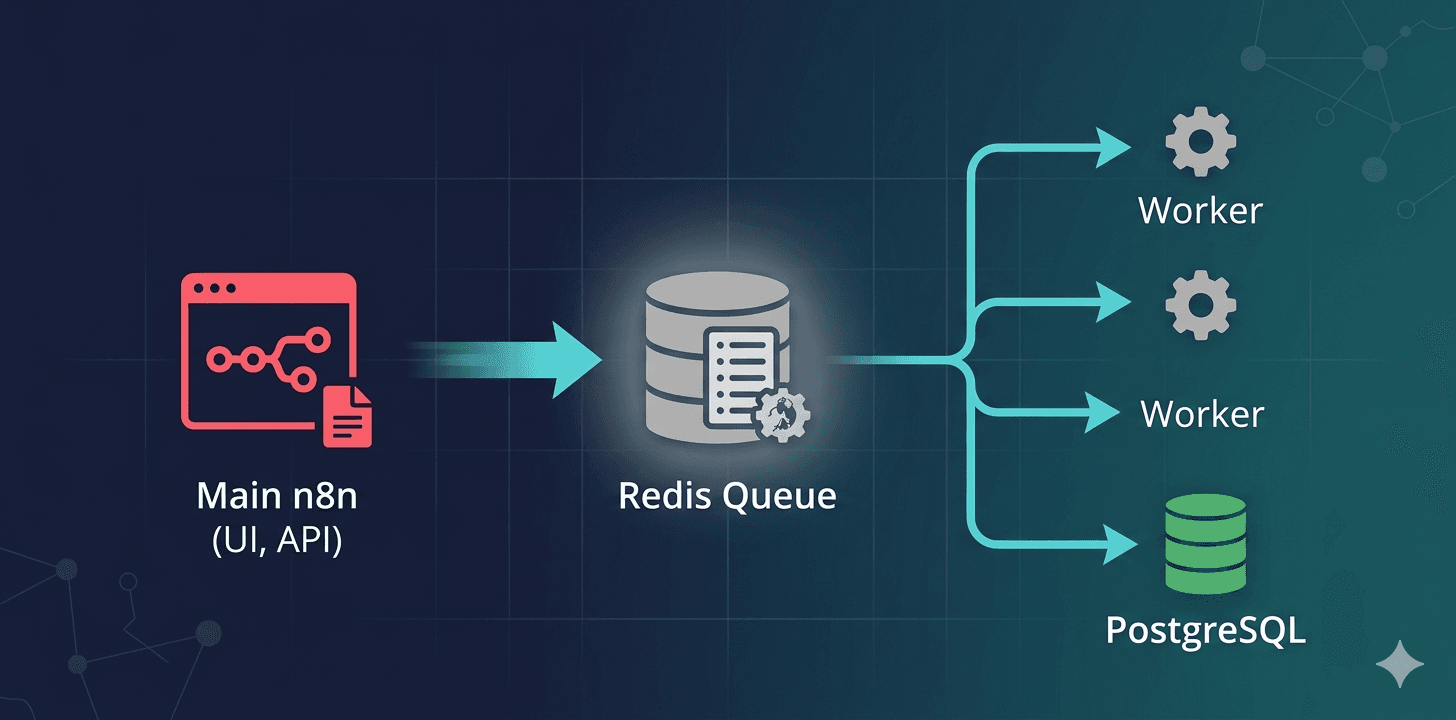
- Queue mode – splits n8n into three roles: a main process (UI & triggers), workers (execution), and Redis (job queue).
- In regular mode – a single process handles everything—execution can block the UI and webhooks.
- You need queue mode – when you exceed ~200 executions/day or see UI lag and webhook timeouts.
- Redis acts – as the job queue, holding tasks until workers are free.
- Setting up queue mode – requires Docker, PostgreSQL, Redis, and careful configuration across multiple containers.
- Managed queue mode – (like Agntable) handles all this complexity for you—auto‑scaling workers included.
What is n8n Queue Mode?
N8n Queue mode is an architectural setting in n8n that separates workflow execution from the main application process. Instead of one n8n container doing everything—serving the UI, listening for webhooks, and running workflows—queue mode splits these responsibilities across multiple, independently scalable components.
In queue mode, you have:
- Main n8n instance– Handles the user interface, API, and triggers (webhooks, schedules). It pushes execution jobs into a queue but does not run workflows itself.
- Redis– A fast in‑memory database that acts as the job queue. It stores pending execution jobs until a worker picks them up.
- Workers– One or more n8n processes that pull jobs from Redis, execute the workflows, and write results back to the database.
- PostgreSQL– The database that stores workflows, credentials, and execution history (SQLite is not supported in queue mode).
This separation is what gives queue mode its power: you can add more workers to handle heavier execution loads without slowing down the UI or missing webhook responses.
Why Does Queue Mode Exist?
The default regular mode (also called "single‑process" mode) works beautifully for small to medium automation loads. One n8n container does everything: it runs the web UI, processes webhooks, and executes workflows all in the same thread.
But as your automation usage grows, that single process becomes a bottleneck. Consider these scenarios:
- A workflow that processes a 50‑row CSV runs in seconds. The same workflow with 50,000 rows can take minutes, during which the entire n8n instance is tied up. Other users can’t open the editor, and incoming webhooks may time out.
- You have five team members building workflows. While one executes a heavy job, everyone else experiences UI lag.
- Your business grows, and scheduled workflows overlap. With regular mode, workflows queue up behind each other, causing delays.
Queue mode solves these problems by decoupling execution from everything else. For teams that want these scaling benefits without handling Redis, workers, and infrastructure themselves, managed n8n hosting is often the simpler path.
The UI and webhooks stay responsive because execution is offloaded to workers. If you need more processing power, you add workers—not a bigger server.
Regular Mode vs Queue Mode: Key Differences
| Aspect | Regular Mode | Queue Mode |
|---|---|---|
| Architecture | Single process | Main + workers + Redis + PostgreSQL |
| Concurrency | Limited by N8N_CONCURRENCY_PRODUCTION_LIMIT (default: unlimited, but single‑threaded) | Each worker can run multiple concurrent jobs; workers scale horizontally |
| UI Responsiveness | Degrades under heavy execution load | Remains fast—execution runs separately |
| Webhook reliability | May time out when the process is busy | Webhooks return immediately; jobs are queued for processing |
| Scalability | Vertical only (upgrade server) | Horizontal (add more workers) |
| Database | SQLite (default) or PostgreSQL | PostgreSQL required |
| Setup complexity | Low (single container) | High (multiple services) |
When You Need Queue Mode (Workflow Volume Thresholds)
There’s no hard‑and‑fast number, but real‑world experience shows that queue mode becomes beneficial when:
- You exceed 200 workflow executions per day. At this volume, the cumulative load can cause noticeable UI slowdowns and occasional webhook timeouts.
- Workflows run longer than 30 seconds. Anything that processes files, paginates through API results, or waits for external services will block the main process.
- You have multiple users. Even with light usage, if two people are building workflows while a third triggers an execution, the shared process struggles.
- Webhook‑driven integrations are critical. If Stripe, Slack, or other services expect a 200 OK within a few seconds, queue mode ensures they get it— execution happens in the background.
If any of these sound familiar, queue mode will transform your n8n experience.
What Redis Has to Do with n8n Queue Mode
Redis is the message broker that makes queue mode possible. Here’s exactly how it works:
- Main instance enqueues jobs – When a workflow triggers (via webhook, schedule, or manual run), the main process pushes a job object into a Redis list. The job contains the workflow ID, execution data, and a unique ID.
- Workers poll Redis – Each worker continuously listens to the Redis queue. When a job appears, the first available worker grabs it using Redis’s atomic pop operation—no two workers get the same job.
- Workers execute and report – The worker runs the workflow, writes the execution result to PostgreSQL, and logs any errors. It then returns to the queue for the next job.
- Redis persists if needed – With the
--appendonly yesflag, Redis can save the queue to disk. If Redis restarts, queued jobs are restored.
Without Redis, workers would have no way to coordinate. It’s the glue that allows multiple processes to share work reliably.
Setting Up Queue Mode: Complexity Overview
Queue mode is powerful, but it’s not a simple toggle. Even a normal n8n Docker setup becomes more complicated here because you now have to coordinate PostgreSQL, Redis, workers, and shared environment variables. Here’s what a typical setup involves.
Prerequisites
- A VPS with at least 2 vCPUs and 4GB RAM– Redis and PostgreSQL together use ~1GB; each worker adds 200–500MB.
- Docker and Docker Compose– The recommended way to orchestrate all components.
- PostgreSQL– SQLite does not support multiple processes writing to the same file; corruption is inevitable.
- Redis– Usually in its own container, configured for persistence.
- Command‑line comfort– You’ll need to edit YAML, set environment variables, and debug logs.
If you’re still deciding whether this level of infrastructure work is worth it, our guide on n8n VPS vs managed hosting breaks down the trade-offs more clearly.
Key Environment Variables
You must set these consistently across all containers:
| Variable | Value | Purpose |
|---|---|---|
EXECUTIONS_MODE | queue | Enables queue mode |
QUEUE_BULL_REDIS_HOST | redis | Points to the Redis container |
QUEUE_BULL_REDIS_PORT | 6379 | Default Redis port |
DB_TYPE | postgresdb | Switches from SQLite to PostgreSQL |
DB_POSTGRESDB_HOST | postgres | Points to the PostgreSQL container |
N8N_ENCRYPTION_KEY | (same on all) | Must be identical for the main and workers to decrypt credentials |
Docker Compose Structure
A minimal queue mode docker-compose.yml includes:
services:
  postgres:
    image: postgres:15-alpine
    environment: …
    volumes: …

  redis:
    image: redis:7-alpine
    command: redis-server --appendonly yes
    volumes: …

  n8n:
    image: n8nio/n8n:latest
    environment: …
    depends_on: [postgres, redis]

  n8n-worker:
    image: n8nio/n8n:latest
    environment: …  # same as n8n
    depends_on: [postgres, redis]

    command: worker
You can scale workers with docker compose up -d --scale n8n-worker=3.
Challenges
- Environment variable mismatch – If encryption keys or Redis hosts differ, workers can’t pull jobs or decrypt credentials.
- Database connection limits – PostgreSQL must be configured to handle connections from multiple workers.
- Worker failure handling – If a worker crashes mid‑execution, the job may be lost unless you implement retry logic.
- Monitoring – You need to track Redis queue length, worker health, and database load.
For most teams, this complexity is a barrier—which is why managed solutions exist.
Managed Queue Mode — How Agntable Handles This for You
If setting up and maintaining queue mode feels daunting, you’re not alone. Many teams would rather focus on building automations than orchestrating containers.
Agntable offers n8n hosting with queue mode built in. When you deploy n8n queue mode on Agntable:
- Redis and PostgreSQL are pre‑configured with production‑ready settings.
- Workers scale automatically based on queue length—no manual
Docker Compose scale. - SSL, daily backups, and monitoring are included out of the box.
- Environment variables are managed centrally; you never touch a
.envfile. - Dedicated resources ensure your workers aren’t competing with noisy neighbours.
Deploying n8n in queue mode on Agntable takes 3 minutes—not 3 hours of YAML debugging.
Queue Mode Performance Benchmarks
Real‑world performance depends on workflow complexity and infrastructure, but here are typical results:
| Configuration | Throughput | Use Case |
|---|---|---|
| 1 worker, concurrency 5 | ~5 simultaneous executions | Small teams, < 500 executions/day |
| 2 workers, concurrency 5 each | ~10 simultaneous executions | 500–2,000 executions/day |
| 4 workers, concurrency 8–10 each | ~40 simultaneous executions | High‑volume production, thousands/day |
With proper sizing, queue mode can handle hundreds of thousands of executions per month without degrading the UI.
Conclusion: When to Make the Switch
Queue mode transforms n8n from a single‑threaded tool into a horizontally scalable automation platform. It’s essential when:
- You exceed 200 executions/day or see UI lag
- Webhook timeouts become common
- You have multiple team members using n8n
- You need reliable, high‑throughput automation
The trade‑off is complexity. Setting up Redis, PostgreSQL, and workers correctly requires significant expertise and ongoing maintenance.
If you’re ready for queue mode but don’t want to become a DevOps engineer, managed platforms like Agntable give you enterprise‑grade scalability without the infrastructure headache. Deploy n8n queue mode in 3 minutes—auto‑scaling workers, managed Redis, and all the performance you need.