How to Self-Host n8n in 2026: VPS vs Managed Hosting (Full Comparison)
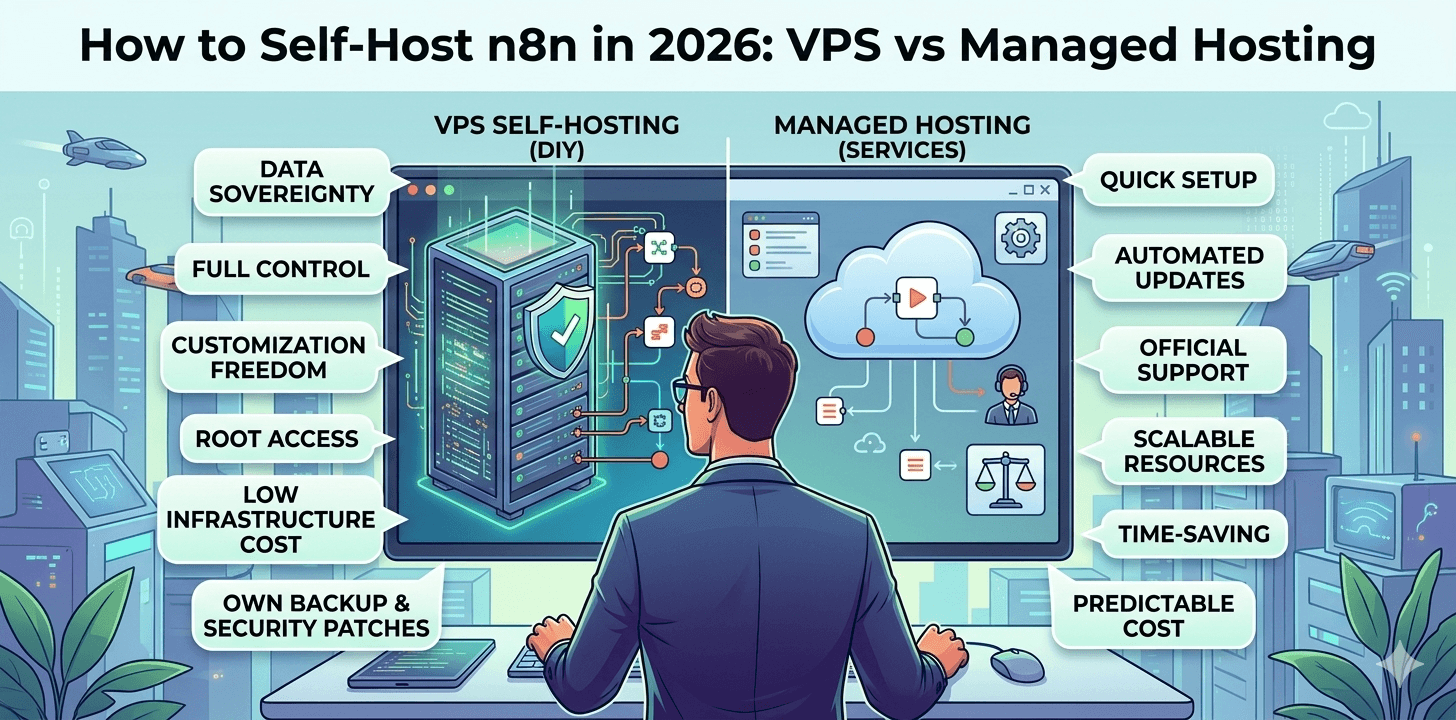
Why Self-Host n8n in 2026?
You’ve decided to use n8n. Smart move. With over 1,900 integrations, AI workflow capabilities, and a fair‑code license that puts you in control, n8n has become the default choice for developers and businesses who need serious automation without the per‑task pricing nightmares of Zapier or Make.
But now you’re staring at the real question: Where do I actually run this thing?
The official cloud version - n8n Cloud - starts at $22/month for 2,500 workflow executions. It’s polished, supported, and completely hands‑off. You pay, you click, you automate.
Then there’s the Community Edition. Same codebase. Same features. Zero license cost. But you run it yourself.
Self‑hosting means you take responsibility for everything n8n needs to function: a server, an operating system, a database, networking configuration, SSL certificates, automated backups, security patches, version updates, and 24/7 monitoring. It’s your infrastructure now.
So why do thousands of developers and companies choose this route every year?
Data Sovereignty
When you self‑host, your data never touches someone else’s servers. Period.
For healthcare companies handling patient records, that’s HIPAA compliance without third‑party risk. For financial firms with regulatory requirements, it’s the audit trails you control. For anyone building internal tools on sensitive customer data, it’s sleep‑at‑night peace of mind.
Cost Control at Scale
n8n Cloud charges per execution. The Starter plan at $22/month gives you 2,500 executions. The Pro plan at $58/month gives you 10,000. After that, it’s $5 per additional 1,000 executions.
Run 50,000 workflows monthly, and you’re looking at $250/month – $3,000 annually.
Self‑hosted? You pay your server bill and nothing else. A $10 VPS handles 50,000 executions easily. Your automation costs stop growing when your business does.
Customisation Freedom
Need to install custom Python libraries that n8n’s cloud environment doesn’t support? Want to modify n8n’s source code to add internal features? Need to connect to databases that aren’t exposed to the public internet?
Self‑hosting gives you root access. You can bend n8n to fit your exact requirements – not the other way around.
No Vendor Lock‑In
With n8n Cloud, your workflows run on their infrastructure with their database. If you ever need to migrate - whether due to pricing changes, feature limitations, or acquisition - you’re looking at a nontrivial export/import process.
Self‑hosted n8n runs on standard Docker containers with SQLite or PostgreSQL. You can pick up and move to any provider, any server, any cloud, in under an hour.
The Spectrum of Self‑Hosting: It’s Not Binary
“Self‑hosting” isn’t a single thing. It’s a spectrum.
| Level | What You Handle | What’s Handled For You | Examples |
|---|---|---|---|
Raw VPS | Everything: OS, Docker, n8n, SSL, backups, updates, monitoring | Nothing | Hetzner + manual setup |
VPS + One‑Click Apps | OS updates, security patches, backups, and monitoring | Initial n8n installation | Hostinger VPS with n8n pre‑installed |
PaaS (Platform as a Service) | n8n configuration, workflow logic | Server, Docker, basic monitoring | Railway, PikaPods |
Specialized Managed | Workflow logic only | Everything infrastructure‑related | Agntable, n8n Cloud |
Where you land depends on one question: what’s your time worth?
Option 1: The Raw VPS Route – Full DIY
A VPS – Virtual Private Server – is the classic self‑hosting approach. You rent a server from a provider like Hetzner, DigitalOcean, or Hostinger, install Docker, and run n8n yourself.
What You’ll Actually Pay (2026 Pricing)
Server costs have dropped dramatically. Here’s what you’ll pay today:
| Provider | Plan | vCPU | RAM | Storage | Monthly Cost |
|---|---|---|---|---|---|
Hetzner | CAX11 (ARM) | 2 | 4 GB | 40 GB | ≈€3.79 ($4.00) |
Hostinger | KVM 2 | 2 | 8 GB | 100 GB | ≈$6.99 |
DigitalOcean | Basic | 2 | 4 GB | 80 GB | ≈$12.00 |
Vultr | Cloud Compute | 2 | 4 GB | 80 GB | ≈$12.00 |
The cheapest reliable option is Hetzner’s ARM instance at roughly $4.00/month.
Before You Start: What You’ll Need
- A VPS account (Hetzner, DigitalOcean, etc.) – allow 24h for ID verification
- A domain name ($5 – $15/year) pointed to your server
- Basic familiarity with the terminal/command line
- 3 – 5 hours of uninterrupted time
- Patience (seriously)
Step‑by‑Step: Setting Up n8n on a VPS
Let’s walk through what a real VPS setup looks like. No shortcuts. If you want to see the common mistakes people make during an n8n Docker setup, it helps to review those before going too far with a DIY server.
Step 1: Provision Your Server
Create an account at Hetzner. Select the CAX11 plan, choose Ubuntu 24.04 LTS, add your SSH key, and deploy. About 60 seconds later, you have an IP address and root access.
Step 2: Connect via SSH
ssh root@your_server_ipStep 3: Harden Your Server Immediately
# Update everything
apt update && apt upgrade -y

# Create a non-root user
adduser deploy
usermod -aG sudo deploy

# Disable root login over SSH
nano /etc/ssh/sshd_config
# Change PermitRootLogin yes → PermitRootLogin no

# Set up firewall
ufw allow OpenSSH
ufw enable
Step 4: Install Docker and Docker Compose
curl -fsSL https://get.docker.com | shStep 5: Create the n8n Directory Structure
mkdir ~/n8n-docker
cd ~/n8n-docker
mkdir data backups
Step 6: Create a Docker Compose File (with PostgreSQL for production)
services:
  postgres:
    image: postgres:15
    restart: always
    environment:
      - POSTGRES_USER=n8n
      - POSTGRES_PASSWORD=secure-password-here
      - POSTGRES_DB=n8n
    volumes:
      - ./postgres-data:/var/lib/postgresql/data

  n8n:
    image: n8nio/n8n:latest
    restart: always
    ports:
      - "5678:5678"
    environment:
      - DB_TYPE=postgresdb
      - DB_POSTGRESDB_HOST=postgres
      - DB_POSTGRESDB_PORT=5432
      - DB_POSTGRESDB_USER=n8n
      - DB_POSTGRESDB_PASSWORD=secure-password-here
      - DB_POSTGRESDB_DATABASE=n8n
      - N8N_BASIC_AUTH_ACTIVE=true
      - N8N_BASIC_AUTH_USER=admin
      - N8N_BASIC_AUTH_PASSWORD=your-secure-password-here
      - N8N_ENCRYPTION_KEY=generate-a-32-character-random-string
    volumes:
      - ./data:/home/node/.n8n
    depends_on:
      - postgres
Pro tip: Generate a secure encryption key with `openssl rand -hex 16`.
Step 7: Start Everything
docker compose up -dStep 8: Access n8n Locally
curl http://localhost:5678Total time so far: 1-2 days if you know what you’re doing. 2-3 weeks if you’re learning.
The Hidden Work (What No VPS Tutorial Tells You)
Here’s where the “cheap VPS” narrative falls apart. The steps above get n8n running. They do NOT give you a production‑ready system.
1. SSL Certificate (HTTPS)
Without HTTPS, your login credentials and workflow data travel unencrypted. To fix this, you need:
- A domain name ($5‑15/year)
- A reverse proxy (Nginx or Caddy)
- Let's Encrypt certificates configured for auto‑renewal
2. Automatic Backups
Your workflows and credentials live in the `./data` folder. If that folder disappears – server failure, accidental deletion, corruption – everything's gone. You need automated backups to cloud storage.
3. Automatic Updates
n8n releases updates every few weeks. You'll need to manually pull new Docker images and restart the container, or set up Watchtower for auto‑updates (which carries its own risks).
4. Monitoring
What happens when n8n crashes at 3 AM? You won't know unless you set up uptime monitoring with notifications.
5. Database Maintenance
If you use PostgreSQL, you need regular vacuum operations, connection pooling for high loads, and a point‑in‑time recovery configuration.
Real story: I once spent three hours debugging why webhooks weren't arriving. Turned out my Nginx config had a typo that silently dropped certain requests. No error message. No logs. Just… nothing. That's the kind of hidden tax you pay with DIY hosting.
The VPS Reality Check
Here's the truth: A $4 VPS costs $4 like a $1 lottery ticket costs $1. The ticket price is real, but it's not the full story.
| Task | Frequency | Time Required |
|---|---|---|
Initial setup | Once | 2–4 hours |
Security updates | Weekly | 15–30 minutes |
n8n version updates | Monthly | 30–60 minutes |
Backup verification | Monthly | 30 minutes |
SSL renewal checks | Quarterly | 15 minutes |
Performance tuning | As needed | 1–2 hours |
Troubleshooting | Random | 1–3 hours per incident |
At $50/hour, that’s easily $150–250/month in hidden maintenance cost – often more than managed hosting.
Option 2: Managed Hosting – What Each Platform Actually Delivers
This is where most people land. You want the benefits of self-hosting without the maintenance headache. For many teams, managed n8n hosting is the easiest way to keep control over workflows without taking on server maintenance. Someone else runs the servers; you just use n8n.
But “managed” means different things to different platforms. Let’s walk through the real options in 2026 - including what their marketing doesn’t tell you. If you want a broader breakdown of the leading options, our guide to the best n8n hosting providers compares them side by side.
The Managed Landscape: Pros and Cons
| Platform | Starting Price | What’s Good | What’s Not | |
|---|---|---|---|---|
PikaPods | ≈$3.80/month | Simple, cheap, large app catalogue | Shared resources, no dedicated support, community forums only, resource limits under load | |
InstaPods | $3/month | Very cheap, includes SSL | New platform (2026), limited to three apps, unproven track record | |
Railway | Usage‑based (≈$5–15) | Developer‑friendly, Git deploys, auto‑scaling | Surprise billing, no cost alerts, you still manage environment variables | |
Elestio | ≈$17/month | Dedicated VM, choose cloud provider | OS‑level maintenance is still on you; “managed” stops at the hypervisor | |
n8n Cloud | $22+/month | Official support, collaboration features | Per‑execution pricing gets expensive, no root access, limited customisation | |
Agntable | $9.99/month | Dedicated resources, PostgreSQL, automated everything, built for AI tools | Newer platform (launched 2026), currently focused on AI automation tools rather than general web hosting |
What “Managed” Really Means
PikaPods runs on Kubernetes with resource overcommitment. That $3.80/month gets you a slice of a server – not a dedicated allocation. When your neighbour’s site gets traffic, your n8n workflows slow down. Support is community forums; when something breaks, you wait.
Railway uses usage‑based pricing. You pay for RAM, CPU time, storage, and egress. A buggy workflow can double your bill overnight with no alerts. It’s great for development, but production costs are unpredictable.
Elestio gives you a dedicated VM but calls it “managed” because they installed n8n once. After that, OS updates, security patches, and backups are your responsibility. It’s a VPS with a one‑time setup helper.
n8n Cloud is polished and supported, but per‑execution pricing punishes scale. At 50,000 executions/month, you’re paying $250 – ten times what equivalent infrastructure costs. And you’re locked into their environment.
Agntable takes a different approach: dedicated resources, flat monthly pricing, and full infrastructure management – including OS updates, SSL, backups, and monitoring. It’s built specifically for AI automation tools like n8n, so configurations are optimised out of the box. The trade-off is a smaller app catalogue (currently focused on AI agents), but it’s growing monthly.
The Real Cost Comparison (Time = Money)
Let’s put numbers to it.
Assume your time is worth $50/hour – a conservative rate for a developer or any professional doing billable work. If you earn more, the gap widens even further in favour of managed hosting.
Scenario: Small Business, 15 Workflows, 10,000 Executions/Month
VPS Route (Hetzner CAX11):
- Server: $3.55 × 12 = $43
- Domain: $12/year
- Your time:
- Initial setup: 4 hours
- Weekly maintenance: 15 min × 52 = 13 hours
- Monthly deep maintenance: 1 hour × 12 = 12 hours
- Incident response: 5 hours/year (conservative)
- Total time: 34 hours/year
- At $50/hour: $1,700
- True Year 1 Cost: $1,755
General Managed (PikaPods M2 size):
- Hosting: $8.50 × 12 = $102
- Your time:
- Initial setup: 30 minutes
- Troubleshooting slow performance: 4 hours/year
- Migration planning (when you outgrow it): 2 hours
- Total time: 6.5 hours/year
- At $50/hour: $325
- True Year 1 Cost: $427
Official Cloud (n8n Cloud Pro):
- Hosting: $50 × 12 = $600
- Your time:
- Initial setup: 15 minutes
- Execution monitoring: 2 hours/year
- Total time: 2.25 hours/year
- At $50/hour: $113
- True Year 1 Cost: $713
Agntable (Pro Plan):
- Hosting: $24.99 × 12 = $300
- Your time:
- Initial setup: 3 minutes
- Ongoing: 0 hours (everything handled)
- Total time: 0.05 hours/year
- At $50/hour: $2.50
- True Year 1 Cost: $302.50
The Insight: When you value your time, “cheap” options aren’t cheap. Agntable and similar dedicated managed platforms often provide better total value – especially for production workloads.
Who Should Choose What
There’s no single right answer – only the right fit for your use case.
Choose the VPS route if:
- You enjoy server administration (not just tolerate it).
- You need custom modifications to n8n’s core code.
- You have strict regulatory requirements for on‑premises data only.
- You’re already running multiple self‑hosted apps and want to consolidate.
Choose general managed hosting (PikaPods/Railway) if:
- You’re a hobbyist with light, non‑critical workloads.
- Budget is your primary constraint, and you accept trade‑offs in reliability.
- You’re okay with community support and potential performance variability.
Choose n8n Cloud if:
- You need official support and collaboration features only available there.
- Your workflow volume is low enough that per‑execution pricing doesn’t hurt.
- You want zero infrastructure responsibility and accept the premium.
Choose a specialised managed platform like Agntable if:
- You’re running n8n for business workflows where downtime costs money.
- You want self‑hosting benefits (control, data sovereignty) without the maintenance.
- You need infrastructure optimised for AI automation tools.
- You want predictable pricing that doesn’t punish success.
How to Migrate Between Platforms
Whether you’re moving from a VPS to managed hosting, or between managed providers, the migration steps are straightforward:
- Export your workflows from the source n8n instance (Settings → Export).
- Document your credentials – n8n does not export credentials for security, so capture them securely.
- Deploy a new instance on your target platform (VPS, PikaPods, Agntable, etc.).
- Import workflows into the new instance.
- Recreate credentials manually.
- Update webhook URLs in any external services that point to your old instance.
- Test thoroughly – run critical workflows and verify they behave as expected.
- Switch DNS if you’re using a custom domain.
For most setups, this takes 1–2 hours. Agntable offers free migration assistance for all plans.
Conclusion: The Right Hosting Is the One You Never Think About
After two years of running n8n in every possible way, here’s the truth I wish someone had told me from the start:
The $4 VPS isn’t cheaper. It’s just a different payment method – one that charges at weekends, frustrations, and 3 AM emergencies instead of dollars.
When you add up the setup time, the weekly maintenance, the unexpected crashes, and the hours spent troubleshooting SSL certificates, that “cheap” server costs most professionals $150‑250/month in lost time. The managed platforms cost less – and give you back something you can’t refund: your attention.
Your Next Move
You don’t need to decide based on a blog post. The beauty of 2026 is that every option lets you try before you commit.
If you’re curious whether managed hosting could save you 30+ hours a year, here’s an easy test:
Deploy n8n on Agntable. It takes three minutes – literally the time to make coffee. No credit card required for the first 7 days. Import a workflow you already run. See how it feels to have SSL, backups, and monitoring handled automatically.
If you decide it’s not for you, export your workflows and cancel. You’ve lost nothing but gained clarity.
If you decide it is for you? You just got dozens of hours back in your year.
👉 Deploy n8n – no servers, no terminal, no DevOps. Just n8n, up and running in minutes.